

SQL Server is designed to handle thousands of concurrent requests efficiently. One of the key internal settings that controls how SQL Server manages concurrency is Max Worker Threads. Misunderstanding or incorrectly configuring this setting can lead to performance bottlenecks and slow query execution. In this blog, we will break down what Max Worker Threads are, how SQL Server uses them, and when (if ever) you should change the default value.
What Are Worker Threads in SQL Server?
A worker thread is an operating system thread that SQL Server uses to execute tasks such as:
- Running queries
- Processing logins
- Handling background operations
- Executing parallel query tasks
Each incoming request generally needs a worker thread. If no worker thread is available, the request must wait, even if CPU and memory are free.
What Are Max Worker Threads?
Max Worker Threads defines the maximum number of worker threads that SQL Server can create to handle user requests.
- It is a server-level configuration
- Default value = 0 (Auto-configured)
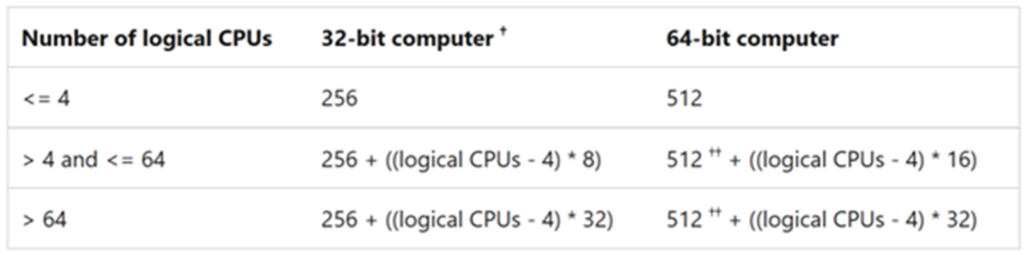
SQL Server calculates the optimal number based on:
- Number of logical CPUs
- SQL Server architecture
- Default Behaviour (Recommended)
- When set to 0, SQL Server automatically determines the number of worker threads.
EXEC sys.sp_configure ‘max worker threads’;
Typical auto-calculated values: (64-bit computer)
- 4 CPUs → ~512 threads
- 8 CPUs → ~1024 threads
- 16+ CPUs → scales accordingly
Microsoft strongly recommends leaving this setting at the default unless there is a proven issue.
Why Max Worker Threads Matter
If Max Worker Threads is too low:
- Requests wait for available threads
- Application response times increase
- You may see THREADPOOL waits
If Max Worker Threads is too high:
- Excessive context switching
- Increased CPU overhead
- OS-level performance degradation
- THREADPOOL Waits – The Red Flag
When SQL Server runs out of worker threads, requests wait on THREADPOOL.
Check using the below query:
SELECT *
FROM sys.dm_os_wait_stats
WHERE wait_type = ‘THREADPOOL’;
Consistent THREADPOOL waits usually indicate:
- Too many concurrent connections
- Long-running queries
- Inefficient parallelism
- Blocking issues
When should you NOT Change Max Worker Threads?
- When SQL Server is using the default configuration. Changing it without evidence often makes performance worse, not better.
- When there is no proven thread exhaustion
- When the bottleneck is CPU, I/O, or blocking. Then increasing worker threads just adds more contention, not throughput.
- On systems with many CPU cores (especially ≥ 8 cores). SQL Server scales worker threads automatically as CPUs increase.
- In high parallelism environments without fixing MAXDOP. Changing worker threads can amplify Thread starvation, reduce cache efficiency and lead to unstable query performance.
When Should You Change Max Worker Threads?
Changing this setting should be rare. Consider it only if:
- Persistent THREADPOOL waits.
- Very high connection count (thousands)
- SQL Server hosts many small, fast queries
- After fixing query tuning & blocking issues
Do not change it as a first troubleshooting step.
How to Change Max Worker Threads if required.
EXEC sys.sp_configure ‘show advanced options’, 1;
RECONFIGURE;
EXEC sys.sp_configure ‘max worker threads’, 1024;
RECONFIGURE;
Best Practices
- Leave at default (0) for most systems.
- Investigate blocking & parallelism first.
- Monitor THREADPOOL waits over time.
Avoid changing this on systems with:
- Low CPU
- OLTP workloads with tuned queries
Max Worker Threads vs MAXDOP
These two settings are often confused:
Purpose
| Max Worker Threads | Total available threads | |
| MAXDOP | Threads per query |
Poor MAXDOP settings can consume worker threads faster, indirectly causing THREADPOOL waits.
Real-World Scenario
A system with below configuration:
- 32 CPUs
- MAXDOP = 0
- Many concurrent reports
Which Results in:
- Parallel queries consume many threads.
- Worker threads exhausted
- THREADPOOL waits spike.
How to Fix this issue:
- Tune queries
- Set appropriate MAXDOP
- Keep Max Worker Threads at default
Conclusion
Max Worker Threads is a critical but often misunderstood SQL Server configuration. In most cases, SQL Server’s default calculation is optimal. Instead of tuning this value blindly, focus on query optimisation, blocking resolution, and parallelism settings.
Related Links:
Server Configuration: max worker threads – SQL Server | Microsoft Learn