

The Ghost in the Machine – How a Simple SELECT Paralysed a 1TB SQL Server
In database administration, we usually equate performance tuning with the heavy lifting of the database world untangling knots of complex joins or carefully indexing massive tables that have outgrown their original design.
But what happens when you have a top-tier server 1TB of RAM, high-speed CPUs with 16 physical cores and 32 logical processors, and a “simple” stored procedure brings the system to its knees by something almost invisible.
The culprit doesn’t always need to lack of resources; here’s the story of a microscopic traffic jam in the SQL Server metadata engine.
18-Minute Lock
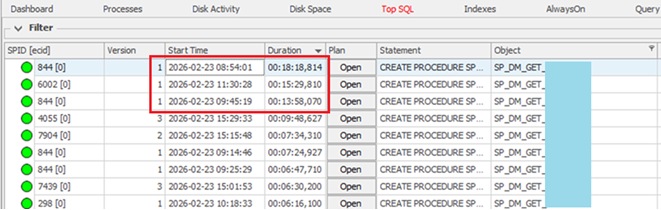
Our monitoring began flagging severe blockings through the day. The primary object involved was a frequently called stored procedure used for lookups.
On paper, this procedure is lightweight. However, it was being executed at a massive scale: approx. 350-400 times per second.
Wait times weren’t just creeping up; they were exploding. In a single week, total wait times ballooned from 6.24 hours to over 8.41 hours. At its peak, a single blocking chain lasted 18 minutes. For 18 minutes, a high-spec server simply… waited.
It brings to mind the old frustration of standing in the world’s longest queue.
TempDB Metadata Contention
Checking through the wait types, we found a specific one, LCK_M_S (Schema Stability Lock) on a system object in TempDB: sys.sysschobjs.

Every time a session executes a stored procedure or accesses a temporary object, SQL Server must verify that the object exists and its structure hasn’t changed. To do this, it places a lock on the metadata entry in the system table sys.sysschobjs.
At a frequency of nearly 400 executions per second, the SQL engine was effectively hammering the Clustered Index of this system table. The engine wasn’t struggling to find the data; it was stuck in a queue just trying to read the definition of the table before the query could even start.
Memory-Optimised Metadata
Since the environment is running on SQL Server 2019, we had a modern silver bullet at our disposal: Memory-Optimised TempDB Metadata.
By default, the configuration IsTempdbMetadataMemoryOptimized is set to 0 (Off). When toggled to 1, SQL Server moves those heavy-traffic system tables from traditional disk-based structures into latch-free, memory-optimised structures.
Eradication
After a service restart to apply the change, the results were a flatline in the best way possible:
- Execution Rate: Remained steady (376+ calls/second).
- Previous Peak Blocking: 18 minutes.
- Post-Implementation Blocking: Zero.
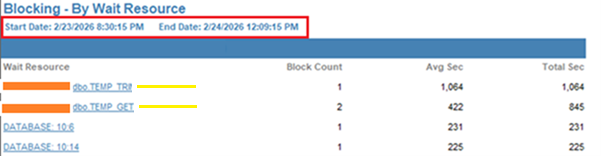
- Outcome: The contention on sys.sysschobjs, which had accumulated 14 hours of wait time over the previous 2 weeks:

To Complete Eradication:
Know the Risks Before You Toggle
While the performance gains are massive, this isn’t a free upgrade. There are several technical trade-offs and limitations to consider before flipping the switch:
- Breaking Changes: You cannot create COLUMNSTORE indexes on #temp tables once this is enabled.
- Memory Pressure: Metadata is now stored in RAM. In older versions of SQL Server 2019 (pre-CU13), there were known memory leak issues. Ensure you are fully patched to avoid Error 701 (Out of Memory).
- The Restart: This change requires a full SQL Service restart to enable or disable. It is not an online configuration.
- Scope: This specifically fixes metadata contention. If your bottleneck is PAGELATCH on actual data pages, this feature will not help.
The Lesson for DBAs
High-frequency simple queries can be more dangerous than occasional “heavy” ones. If you see LCK_M_S waits on TempDB system objects, don’t buy more hardware, change the metadata architecture.