

In many enterprise environments, DevOps is already well established. Applications, infrastructure, APIs, and data platforms are deployed through Azure DevOps pipelines with approvals, audit trails, and clear separation between Dev and Prod.
For a long time, Fabric didn’t fit neatly into that picture.
I worked with one customer where everything was deployed through DevOps – except Fabric items. Semantic models, reports, and notebooks were still being published manually between workspaces. As a result, Fabric releases were out of sync with the rest of the platform, deployments relied on manual steps, and there was no consistent way to track what changed and when.
Until fairly recently, this was hard to avoid. Proper DevOps support for Fabric has only started to emerge over the past one to two years. Before that, the tooling simply wasn’t there. Managing Fabric artefacts in source control was cumbersome, deployments often relied on fragile scripts, and the overall setup was too technical for most teams to justify.
A few key changes have made this much more practical:
- The introduction of PBIP (Power BI Projects, in preview) makes semantic models source-control-friendly
- The release of Fabric REST APIs, enabling programmatic deployments
- Built-in Git integration, allowing workspaces to be linked directly to repositories
This blog describes a simple CI/CD pattern for Fabric that builds on these capabilities and uses the fabric-cicd library to handle the heavy lifting. The result is a cleaner, more predictable way to deploy Fabric items through Azure DevOps – one that aligns with existing release processes and provides explicit control and clear separation between environments.
The idea behind this blog
The goal of this blog is not to present a perfect or fully mature DevOps implementation for Fabric. Instead, it’s to illustrate a simple, practical starting point – one that teams can understand, replicate, and adapt using their own pipelines and standards. For example:
- Adding approval gates before Prod deployments
- Introducing branching or release strategies
- Restricting which items deploy to which environments
- Splitting deployments across multiple stages
Prerequisites
To implement a pipeline based on this pattern, there are a few one-time setup steps required around authentication and access. You’ll need:
- An Azure DevOps service connection configured with a service principal. (See the following blog from Richard Mintz).
- Service principal access to the Fabric APIs, enabled in the Fabric tenant settings
- The service principal was added to each target Fabric workspace (for example, Dev and Prod) with appropriate permissions
Once this is in place, pipelines can authenticate to Fabric and deploy items programmatically without relying on user accounts.
Repository structure
At a high level, the repository should contain:
- A deployment script (deploy.py)
- An Azure DevOps pipeline definition
- Configuration files for workspace mapping and parameterisation
- A folder containing the Fabric items themselves
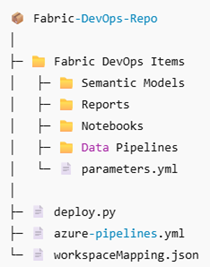
What you need to configure in your own implementation
Azure DevOps service connection
The pipeline authenticates to Fabric using an Azure DevOps service connection. In the pipeline YAML, this is referenced by name:
- task: AzurePowerShell@5
  displayName: Deploy Fabric items
  inputs:
    azureSubscription: '***CHANGE THIS TO YOUR SERVICE CONNECTION NAME***'
Workspace mapping
A workspace mapping file defines which Fabric workspace corresponds to each environment. This allows the same pipeline and deployment logic to target different environments.
{
  "Dev": {
    "workspaceId": "42781a5e-90e4-49e7-a1de-6e2df04aa20a"
  },
  "Prod": {
    "workspaceId": "a2bc4787-84aa-49b2-994d-dcfa0f657c70"
  }
}
At runtime, the selected environment determines which workspace ID is used.
Environment-specific parameterisation
Environment-specific values – such as data source endpoints or connection identifiers – are defined in a parameterisation file.
find_replace:
    - find_value: "gs8fdg98usgoigdoidjf.datawarehouse.fabric.microsoft.com"
      replace_value:
          Dev: "gs8fdg98usgoigdoidjf.datawarehouse.fabric.microsoft.com"
          Prod: "djfsd8df7897sg98f7sd.datawarehouse.fabric.microsoft.com"
This allows the same semantic model or report definition to be deployed across multiple environments while pointing to the correct underlying resources.
The pipeline in action
In this example, the pipeline is designed to start with a small set of input parameters. These inputs control the deployment without requiring code changes.
At runtime, the user selects:
- The target environment (for example, Dev or Prod)
- The repository directory containing the Fabric items
- The types of Fabric items to deploy
Once started, the pipeline authenticates to Fabric using the configured service connection, resolves the correct workspace for the selected environment, applies any environment-specific parameterisation, and publishes the Fabric items from source control using the fabric-cicd library.
From the user’s perspective, this becomes a single, repeatable action. There are no manual workspace-to-workspace deployments and no environment-specific scripts to maintain.
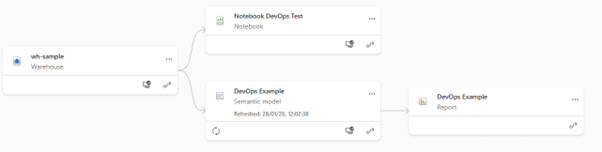
When the pipeline completes, the results are visible immediately in the target Fabric workspace. All items are deployed to the correct environment, and semantic models are published, pointing at the appropriate data sources.
Final thoughts
This approach is intentionally simple. It’s designed to help teams get started with DevOps in Fabric without needing to redesign their entire delivery process. By treating Fabric items like any other deployable asset, teams can bring them into existing DevOps workflows and promote them through environments in a controlled, repeatable way.
The key takeaway is that a single repository can be used to deploy Fabric items across multiple environments and workspaces, with differences handled at deployment time rather than in the code. From here, teams can evolve the pipeline to suit their needs – adding approvals, refining deployment scopes, or introducing more advanced release strategies as their DevOps maturity grows.
If you’re already using DevOps elsewhere in your platform, this provides a practical way to bring Fabric into that same model and remove the last remaining manual steps from your release process.