

Who is Ola Hallengren and What are these Scripts?
To paraphrase Zaphod Beeblebrox’s private brain-care specialist Gag Halfrunt, “Vell, Ola’s just zis guy, you know?” He’s a SQL Server DBA of long service, an MVP who has created and released a set of scripts for SQL Server database maintenance activities (Backups, Integrity Checks, Index and statistics maintenance). These scripts are such a vast improvement over the default SQL Server maintenance plans that they are used by hundreds – thousands – of companies around the world. The scripts are shared on github, and are under active development by the community, and updates are released frequently throughout the year. They’ve been part of my toolbox for 15 years.
Best of all – they’re free. Ola, we thank you.
Databases In Parallel
One of the parameters supported by the three scripts is to set @DatabasesInParallel = ‘Y’. This allows you to have multiple jobs with minimum configuration overhead; this can compress backup and maintenance windows significantly – assuming your IO subsystem is up to the job.
In order to use this, you need to download the schemas for two new tables – Queue and QueueDatabase – and to create them in the same database that hosts the rest of the scripts. These are used to coordinate effort among the jobs that run in parallel. If you have only one SQL Agent scheduled task set up for a particular process, but invoke the @DatabasesInParallel parameter, you must still have those objects.
The parallelism itself is generated by creating multiple jobs to run the scripts. There are some potential gotchas here:
- The jobs must be on the same schedule
- The jobs must have the same parameters.
Neither of these are difficult to overcome.
Pitfalls
Performance
As indicated above, too much parallelism could cause performance to drop off, as multiple simultaneous backup or integrity check jobs flood the IO subsystem, and multiple simultaneous maintenance jobs overload the CPU. So some tuning will be required to find that optimum balance between load on the server, IO, and requirements of the system to service other requests.
Databases in Parallel & Index maintenance jobs
For backups and integrity checks, the parallelism works as expected – one database at a time, with the next database to be backed up or checked being picked from the QueueDatabase table.
Index / Statistics maintenance, however, also does the same thing. This differs from the normal single-threaded option, where all databases have their indexes/statistics analysed before they are rebuilt in priority order. When @DatabasesInParallel is enabled, this process is broken down so each job runs one database at a time.
Deadlocking on CommandLog
No system is perfect. I have seen people set up 20 different index and statistics maintenance jobs on a single server in an attempt to spread the load; however, running multiple jobs simultaneously increases the likelihood of a deadlock occurring on the CommandLog table.
Deadlocking within the various maintenance commands themselves is handled – you’ll see them in the CommandLog table’s ErrorMessage column, and the index maintenance script moves onto the next index to be rebuilt. The job itself fails (or succeeds with a warning if you’ve used the @LockMessageSeverity=10 parameter).
Deadlocking on the CommandLog table itself, however, requires a bit more work to identify. Although the job continues, there’ll be a gap in the CommandLog table as it has not been updated to change EndTime from the default NULL to the actual end time of that maintenance activity. The ErrorMessage field will also be NULL.
If you have deadlock monitoring enabled, you may see something like this (from SentryOne):
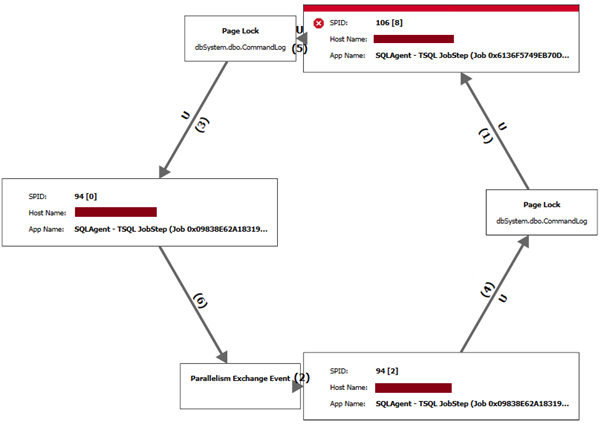
The above is a straightforward example. We have seen more extreme examples – such as this, from the same server another time:
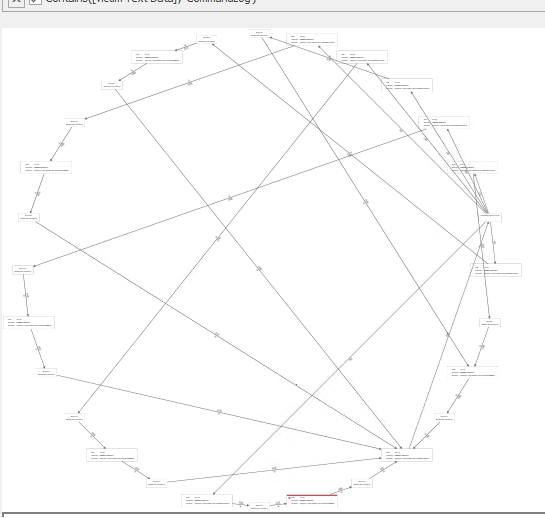
These are caused by the multiple processes all inserting new records and updating CommandLog’s recent records – a lot of INSERT and UPDATE activity on the most recent records in the table. Because the table is built with a clustered index on the ID field – which is, itself, a monotonically increasing IDENTITY field, these newest records are all likely to be on the same page or within the same extent, causing a hotspot of activity at the end of the table.
Klaus Aschenbrenner has a much deeper explanation of the problem in his post An ever-increasing clustered key value doesn’t scale! – well worth a read, as it proposes several solutions.
The solution we have chosen to implement is to add a dummy UniqueIdentifier field which defaults to NEWID(); we rebuild the clustered index on that field, and finally create a replacement unique index on the ID field so performance isn’t affected.

ALTER TABLE [dbo].[CommandLog] ADD Uniqueifier UNIQUEIDENTIFIER NOT NULL DEFAULT NEWID();
GO

ALTER TABLE [dbo].[CommandLog] DROP CONSTRAINT [PK_CommandLog] WITH (ONLINE = OFF);
GO

ALTER TABLE [dbo].[CommandLog] ADD CONSTRAINT PK_CommandLog PRIMARY KEY CLUSTERED (Uniqueifier);
GO

CREATE UNIQUE INDEX [IX_CommandLogID] ON [dbo].[CommandLog] (ID);
GO
This script does not affect the jobs – no modifications are required, although it can take a few seconds to run the script if the CommandLog table is large, so it is advisable to run this when the maintenance tasks aren’t running.
Result
Since implementation, this fix has eliminated that particular error condition, resulting in a monthly double-digit reduction in failed job alerts for these maintenance tasks for one client.