

When I first ventured into the world of databases from an application support role, I remember clients regularly complaining that “everything was slow”. Those conversations usually ended with me nervously approaching the stereotypical grumpy DBA, locked away in the server room. They would glance at the screen, grumble something about indexing, tweak a few settings, mutter about heap tables, scans and seeks, and then, almost magically, everything worked again.
At the time, it felt like voodoo. I had no real idea what indexing was or why it made such a difference. I later learned that an index is a data structure that allows SQL Server to find rows quickly without having to scan every row in a table.
Fast forward to my first DBA role, and things started to make sense. As I studied using books and official training courses, one thing stood out. Indexing, despite being one of the most important performance features in SQL Server, was often covered only briefly. The basics were explained, but the impact, best practices, and common gotchas were rarely explored in any depth.
That gap between theory and reality is exactly what leads to slow systems, frustrated users, and DBAs being called in to perform what looks like magic. In practice, indexing is not magic at all. It is simply about understanding how SQL Server finds data and giving it the right structures to do that efficiently.
The Frustrated Client Scenario
Now let’s look at this from a client’s perspective. They click a button in their application, and they are either hit with a wall of silence or a screen that just sits there saying “Loading…” This quickly turns into frustration and a call to the development or DBA team.
As DBAs, we have all been at the receiving end of a frustrated client and being a DBA, we always want help and to make things perform better. One of the often overlooked but massively important features of SQL Server is the indexing and this post aims to bridge that gap by explaining indexing basics in plain terms, why it matters so much, and how small changes can make a dramatic difference to performance.
So, let’s go back to our simple scenario above. What is going on? All they are trying to do is pull up a single customer record, yet the system behaves as if I have asked it to process the entire database. When this happens, it is usually not the server, the storage, or the network. Often, it comes down to indexing.
Indexing is one of the most effective ways to improve SQL Server performance, but it is also one of the most misunderstood. From the outside, all the client sees is a slow system. Under the covers, SQL Server is working far harder than it should be just to find data.
What SQL Server Is Actually Doing
To explain what is going wrong, imagine your data stored in a huge office filing cabinet containing thousands of customer records.
When I ask the system for one customer, SQL Server can do one of two things.
The Slow Way
It can open the first drawer and start checking every folder one by one until it eventually finds the right record. It gets there in the end, but it wastes time, CPU, and memory. While it is doing this, everything else feels slow too.
This is what a table scan looks like.
The Fast Way
Or it can use clearly labelled drawers, go straight to the correct section, and pull out the right file immediately.
This is an index seek.
From a client’s point of view, the difference is simple. One feels broken. The other feels instant.
Why This Keeps Happening
SQL Server is not slow on purpose. It can only work with what it is given.
If the table does not have the right index, SQL Server has no choice but to scan the entire table. When tables are small, you might not notice. As the system grows, performance quietly degrades until users start complaining.
The Two Index Types That Matter
Most of these problems come back to two types of indexes, or the lack of them.
The Basics
The first check you need to do is determine what indexing exists on the table or tables that are involved in the query? If there is no Clustered index this is what’s known as a heap table. A heap table is a table that is unordered, and as more data is inserted, updated or deleted, the performance gets much worse.
In a perfect world there would be a Clustered index along with a handful of Nonclustered indexes to support the workload.
How do you spot a heap table that doesn’t contain the word heap in it?!
There are some excellent tools available to help with this. One I use almost daily is sp_BlitzIndex from Brent Ozar’s First Responder Kit. However, as this post is focused on fundamentals, I will show you how to identify this using SQL Server Management Studio.
In SSMS expand your table and then hit the little plus sign. You can see below the first table has no indexes at all and the second one has a Clustered Index.
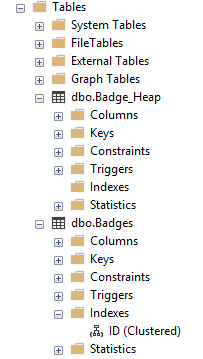
If you right click on the index under the Indexes folder and select Script Index As you will then see the code and what column the Clustered index is on, you can see below the Badges table is ordered by the ID Column:

Why Heap Tables Get Worse Over Time
A heap table has no defined order. Rows are stored wherever SQL Server finds available space, and over time this inevitably becomes a problem.
As data is inserted, updated, and deleted, a heap table becomes increasingly fragmented. Rows can be moved and left behind as pointers, causing SQL Server to follow multiple locations just to retrieve a single row. What may have started as a quick lookup gradually turns into a much more expensive operation. This behaviour is known as forwarded fetches and is a well-known performance killer and will also add additional bloat to the database and therefore increases the space used.
The only way to eliminate forwarded fetches and recover the extra used disk space is by rebuilding the table or by adding a clustered index.
This is why performance on heap tables often degrades slowly over time. Nothing visibly “breaks”, but every query has to work a little harder than before.
Clustered Index
A Clustered index controls how the data is physically stored on the disk.
If the data is organised sensibly, for example by an ID, SQL Server can move through it quickly. If it is not, finding anything becomes harder than it needs to be.
A table can only have one Clustered index, so choosing the right clustering key column(s) matters.
Nonclustered Index
A Nonclustered index is what SQL Server relies on for fast lookups. It contains a selected subset of columns from the table, organised in a way that allows SQL Server to quickly locate the required rows.
It is like a reference card that tells SQL Server exactly where to find the data inside the filing cabinet. Without it, SQL Server is forced to search through each row individually, or in our example, open every drawer one by one. You can have several of these, but every extra one comes at a cost.
The Trade Off Nobody Mentions
The client or end user just wants things to be fast. What they do not see is the tradeoff behind the scenes:
- Indexes make reading data faster.
- Indexes make writing data slower.
Every insert, update, or delete means SQL Server has to update the table, and every index attached to it. Too many indexes can slow the system down just as much as too few.
This is why performance tuning is about balance, not just adding more indexes.
How You Can See the Problem Yourself
The frustrating part is that SQL Server often tells you exactly what it is missing.
When a query runs slowly, the execution plan will often show a green warning saying, “Missing Index Details”. That is SQL Server effectively saying, “I could have done this much faster if you had given me the right index”.
Let us do a simple search, we want to find all the badges that have been awarded to the UserId 4591. Before you run the code press CTRL + M to turn on the execution plan, run the query and once the query has returned the data click on the Execution Plan tab as shown below:
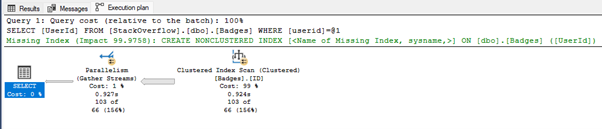
You can see the query has resulted in doing a complete scan of the table which we know contains 27 million rows and has to scan them all just to find the 103 results!
You can even generate a suggested index from this message. It is useful, but it should always be reviewed carefully. In future posts, I will explain why these suggestions are sometimes wrong and how blindly applying them can create more problems.
Let’s add the index suggestion on UserID. You may want to name your index something other than the default [<Name of Missing Index, sysname,>];* as best practice, I would recommend naming the index after the column(s) it includes.
*This is a marker for SSMS to prompt for a different name. Please see the following link for further details: https://learn.microsoft.com/en-us/ssms/template/replace-template-parameters?redirectedfrom=MSDN
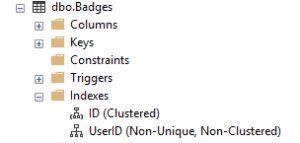
After creating the index, you can see it listed in the same location as the Clustered index within SQL Server Management Studio.
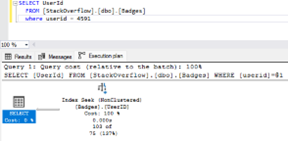
Running the same query now returns a different execution plan. SQL Server is now able to seek directly to the required data, saving CPU, memory, and time.
What They Actually Want Fixed
From a user point of view, the fix is simple.
Stop making SQL Server search for everything when it only needs one record.
That usually means:
- Adding indexes to columns used in WHERE clauses and JOINs.
- Keeping indexes small and focused.
- Avoiding the temptation to index every column just because it exists.
- Resisting the temptation to add every single Index suggestion! This can be catastrophic for performance!
Final Thoughts
When a system feels slow, users do not care about execution plans or index types. They just know something is wrong.
Most of the time, the database is not underpowered. It is simply badly indexed.
If SQL Server is being forced to rummage through every drawer instead of going straight to the right file, slow performance is inevitable.
Fix the indexes, and suddenly the system feels responsive again.
Key Takeaways
- An index can allow SQL Server to find data efficiently without scanning the entire table.
- Scans read every row; seeks go directly to the data that is needed.
- Heap tables have no order and tend to perform worse over time as data becomes fragmented.
- A Clustered index defines how data is physically stored and choosing the correct clustered key is the foundation of good performance.
- Nonclustered indexes support fast lookups but come with a write performance cost.
- More indexes are not always better; indexing is about balance, not quantity.