

Welcome to the second post in this series exploring the ghost cleanup task, the internal process responsible for removing logically deleted rows. If you haven’t read the first post, it’s recommended as it introduces the core concepts and terminology used throughout this series:
- Post 1 – Ghosts! – Ghost Records and the Ghost Cleanup Process
- Post 2 – Seeing the ghost cleanup process in action
- Post 3 – Let the ghosts linger
- Post 4 – Ghosting in the transaction log
- Post 5 – The ghostly case of index corruption
- Post 6 – Questions answered
The first blog post introduced the ghost cleanup process, why it’s used and how it works. In this post, we’ll set up a demo to see the process in action.
Demo set up
We’ll need a demo database with a simple table so we can show the ghost cleanup process; the following code will build that
USE master;

GO

DROP DATABASE IF EXISTS GhostDemo;

GO

/* Create demo database, table and insert data */

CREATE DATABASE GhostDemo;

GO

USE GhostDemo;

GO

CREATE TABLE [dbo].[ViewGhost](

[ID] [int] IDENTITY(1,1) NOT NULL,

[Name] [varchar](100) NULL

) ON [PRIMARY]

GO

CREATE CLUSTERED INDEX PK_ViewGhost

ON dbo.ViewGhost

(ID);

GO
Ghost hunting – Monitoring using Extended Events
Before we create ghost records, we’ll need a method of seeing the process in action. Although we could use sys.dm_exec_requests for live activity, for a better view of the history and correlation of events we’ll use Extended Events. By monitoring sqlserver.ghost_cleanup, a lightweight session can be created to see the activity of the ghost cleanup process.
The following TSQL creates a session that monitors the ghost clean up as well as capturing completed statements and uses causality tracking to see how the different statements do or don’t tie together. Please note that this is designed for a test environment and a ‘temp’ directory is needed on the C drive:
USE master;


/* Stop and drop the session if it exists */


IF EXISTS ( SELECT 1 FROM sys.server_event_sessions WHERE name = N'Monitor_GhostCleanup' )

BEGIN

IF EXISTS ( SELECT * FROM sys.server_event_sessions WHERE name = N'Monitor_GhostCleanup' AND startup_state = 1 )

BEGIN

ALTER EVENT SESSION [Monitor_GhostCleanup] ON SERVER STATE = STOP;

END


DROP EVENT SESSION [Monitor_GhostCleanup] ON SERVER;

END

GO

/* Create a new session */

CREATE EVENT SESSION [Monitor_GhostCleanup]

ON SERVER

ADD EVENT sqlserver.ghost_cleanup

(

ACTION(sqlserver.database_id,sqlserver.sql_text)

WHERE ([sqlserver].[database_name]=N'GhostDemo')

),

ADD EVENT sqlserver.sql_statement_completed

(

WHERE ([sqlserver].[database_name]=N'GhostDemo')

)

ADD TARGET package0.asynchronous_file_target

(

SET filename = N'C:\Temp\GhostCleanupMonitor.xel'

)

WITH

(

MAX_MEMORY = 4096 KB

,      EVENT_RETENTION_MODE = NO_EVENT_LOSS /* Running on a test server, not always recommended for Prod */

,      TRACK_CAUSALITY=ON

);

GO


/* Start the session */

ALTER EVENT SESSION [Monitor_GhostCleanup] ON SERVER STATE = START;

GO
The data here will be viewed later…
Insert data and check for ghost records
Next, insert 12 records then run a SELECT to show the data in the table. We’ll then view the current ghost record count using sys.dm_db_index_physical_stats
USE [GhostDemo];


/* Insert sample rows */

INSERT INTO

dbo.ViewGhost

(Name)

VALUES

('Row')

GO 12


/* Show the data is in the table and visible */

SELECT

*

FROM

dbo.ViewGhost;

GO


/* check ghost record count */

SELECT

OBJECT_NAME(object_id) AS TableName

,      index_id

,      ghost_record_count

,      version_ghost_record_count

FROM

sys.dm_db_index_physical_stats

(

DB_ID(N'GhostDemo'),

NULL, NULL, NULL, 'DETAILED'

)

WHERE

OBJECT_NAME(object_id) = 'ViewGhost'
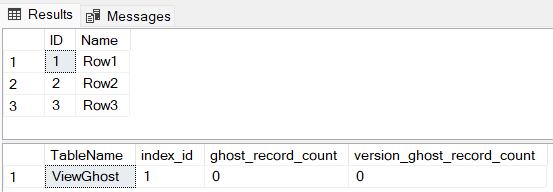
The next script should be run in one go, as it demonstrates the full lifecycle: rows are logically deleted, temporarily remain as ghost records, are then physically removed when the ghost cleanup process runs.
/* Logically delete rows */


DELETE

FROM

dbo.ViewGhost

WHERE

ID IN (1, 2, 3);

GO


/* Immediately after delete, the rows are logically gone.

Loop through the results query to show the ghost cleanup process kick in and clear */

SELECT

*

FROM

dbo.ViewGhost;

GO


/* However, physically they are likely still on the page as ghost records */

SELECT

OBJECT_NAME(object_id) AS TableName

,      index_id

,      ghost_record_count

,      version_ghost_record_count

FROM

sys.dm_db_index_physical_stats

(

DB_ID(N'GhostDemo'),

NULL, NULL, NULL, 'DETAILED'

)

WHERE

OBJECT_NAME(object_id) = 'ViewGhost'

AND

ghost_record_count > 0;


WAITFOR DELAY '00:00:01';

GO 10


/* As the code loops through, signs of the ghost cleanup process are evident: */
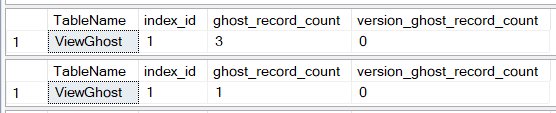
Even after the 10 runs, there is still 1 ghost record left; how to view the location of ghost records will be covered later.
To clear the ghost record the index could be rebuilt:
/* Rebuild index to remove all ghost records */

ALTER INDEX [PK_ViewGhost] ON dbo.ViewGhost REBUILD;

GO


SELECT

OBJECT_NAME(object_id) AS TableName

,      index_id

,      ghost_record_count

,      version_ghost_record_count

FROM

sys.dm_db_index_physical_stats

(

DB_ID(N'GhostDemo'),

NULL, NULL, NULL, 'DETAILED'

)

WHERE

OBJECT_NAME(object_id) = 'ViewGhost'

So far, the demo has shown records being added, deleted and the ghost records being marked then eventually deleted. Any ‘stuck’ ghost records can be cleared with an index rebuild.
The obvious question now is why are they ‘stuck’?
It’s down to performance: As the process is designed to improve performance, if a data page will become empty, the ghost cleanup process may leave one row on the page to remove the immediate need for page deallocation and in turn reducing churn in allocation structures. The page will likely be cleaned up during a later run.
Back to Ghost watching via Extended Events
Use the script below to see the sequence of events and when the ghost cleanup process kicks in. The causality option of the session allows tracking of how many pages are affected in each batch.
-- Read XEvent data from .xel file

WITH XEventData AS

(

SELECT

CAST(event_data AS XML) AS event_xml

FROM

sys.fn_xe_file_target_read_file(

'C:\Temp\GhostCleanupMonitor*.xel'/* Path to .xel files */

,            NULL                         /* No metadata file */

,            NULL                         /* No initial offset */

,            NULL                         /* No end offset */

)

),

X AS

(

SELECT

event_xml.value('(event/@name)[1]', 'varchar(50)') AS event_name,

event_xml.value('(event/@package)[1]', 'varchar(50)') AS package_name,

event_xml.value('(event/@id)[1]', 'int') AS event_id,

DATEADD(hour, DATEDIFF(hour, GETUTCDATE(), CURRENT_TIMESTAMP),

event_xml.value('(event/@timestamp)[1]', 'datetime2'))  AS [timestamp],

event_xml.value('(event/action[@name="database_id"]/value)[1]', 'int') AS database_id,

event_xml.value('(event/action[@name="attach_activity_id"]/value)[1]','varchar(500)') as attach_activity_id,

event_xml.value('(event/action[@name="attach_activity_id"]/value)[1]','uniqueidentifier') AS [attach_activity_id_guid],

event_xml.value('(event/data[@name="file_id"]/value)[1]', 'int') AS file_id,

event_xml.value('(event/data[@name="page_id"]/value)[1]', 'int') AS page_id,

event_xml.value('(event/data[@name="statement"]/value)[1]', 'varchar(4000)') AS statement


FROM

XEventData AS x

)


SELECT

event_name

,      package_name

,      event_id

,      [timestamp]

,      database_id

,      [attach_activity_id_guid]

,      RIGHT((attach_activity_id), CHARINDEX('-', REVERSE(attach_activity_id) + '-') - 1) AS [attach_activity_id_seq]

,      file_id

,      page_id

,      statement

FROM

X

ORDER BY

timestamp

,      attach_activity_id

,      [attach_activity_id_seq];

GO
The results show the DELETE operation occurring at 13:43:22.941. Approximately four seconds later, at 13:43:27.286, the first ghost cleanup cycle runs, affecting two pages. Around 45 seconds later, a subsequent cycle runs, affecting six pages.
Notice that page_id 472 appears again, indicating that not all ghost records were removed during the first pass:

Summary
The demo database has been set up and an extended events session created. Test scripts have been run to demonstrate a delete operation, along with the subsequent ghost cleanup operations. The extended events session demonstrates that the delete and ghost cleanup occur at different times and shows which pages are affected during each cleanup cycle.
Next
The next post will cover how pages are marked for cleanup. It will also show how to disable the cleanup process and cover the effects this can have.