

The first blog post introduced the ghost cleanup process, why it exists and how it works. The second demonstrated the process in action, including monitoring with Extended Events.
This post explores the ghost cleanup process further, including how it can be disabled and a high-level view of the potential impact. It also dives into data pages to show how ghost records are marked.
Disabling the ghost cleanup process can help expose internal behaviour more clearly, making it easier to observe how ghost records are marked and retained on pages.
If you haven’t read the earlier posts, it’s recommended as it introduces the core concepts and terminology and builds the understanding that develops throughout this series:
- Post 1 – Ghosts! – Ghost Records and the Ghost Cleanup Process
- Post 2 – Seeing the ghost cleanup process in action
- Post 3 – Let the ghosts linger
- Post 4 – Ghosting in the transaction log
- Post 5 – The ghostly case of index corruption
- Post 6 – Questions answered
Please note, the code here is designed to run on 2019+, if you are running on an earlier version, please send us a message and we’ll provide specific code for your version.
Disable the Ghost Cleanup Process
Disabling the ghost cleanup process permanently is not recommended by Microsoft. However, disabling it for a controlled period may be appropriate for specific workloads.
When the cleanup process is not running, ghosted records remain on the page, delaying or limiting space reuse until cleanup or other maintenance occurs. This can lead to:
- Table and index bloat
- Increased page splits
However, because the records are not physically removed, workloads that involve high volumes of deletes over a short period, and where no other processes depend on timely cleanup, this may be worth testing.
Disabling the ghost cleanup process is straightforward, as it is controlled by Trace Flag 661. Enabling the trace flag turns off the background ghost record removal task in SQL Server at the instance level; there is no database-level or session-level scope.
Warning: Trace flag 661 disables ghost cleanup at the instance level and should only be used in controlled, non-production scenarios unless fully understood.
Disable the ghost cleanup task:
DBCC TRACEON(661, -1);
Enable the ghost cleanup task again:
DBCC TRACEOFF(661, -1);
When enabled, the trace flag is applied globally. It should not be configured as a startup parameter; it should only be used temporarily with careful consideration and control.
Viewing ghost records on the data page
Our first view of the page data will inspect a single page. Using dynamic SQL, we can extend the earlier demo to include page-level inspection. Trace Flag 3604 will also need to be enabled to display the DBCC output.
The following code will:
- Truncate the table
- Enable TF 3604
- Insert 12 records
- Verify the data
- Delete 11 records
- Confirm logical deletion
- Check for ghost records
- Inspect the page header and record markings
Run the entire block in one go:
USE [GhostDemo];


SET NOCOUNT ON;

TRUNCATE TABLE dbo.ViewGhost;

DBCC TRACEON(3604); /* print results to query window */

GO

/* Insert sample rows */

INSERT INTO

             dbo.ViewGhost

             (Name)

VALUES

             ('Row')

GO 12

/* Show the data is in the table and visible */

SELECT

             *

FROM
             dbo.ViewGhost;
GO
/* check ghost record count */

SELECT

             OBJECT_NAME(object_id) AS TableName

       ,      index_id

       ,      ghost_record_count

       ,      version_ghost_record_count

FROM

             sys.dm_db_index_physical_stats

             (

                    DB_ID(N'GhostDemo'),

                    NULL, NULL, NULL, 'DETAILED'
             )
WHERE

             OBJECT_NAME(object_id) = 'ViewGhost'
GO

/* Logically delete rows */

DELETE

FROM
             dbo.ViewGhost

WHERE
             ID > 1;

GO

/* Immediately after delete, the rows are logically gone */

SELECT
             *

FROM
             dbo.ViewGhost;

GO

/* However, physically they are likely still on the page as ghost records */

SELECT

             OBJECT_NAME(object_id) AS TableName

       ,      index_id

       ,      ghost_record_count

       ,      version_ghost_record_count

FROM

             sys.dm_db_index_physical_stats

             (

                    DB_ID(N'GhostDemo'),

                    NULL, NULL, NULL, 'DETAILED'

             )
WHERE

             OBJECT_NAME(object_id) = 'ViewGhost'

             AND

             ghost_record_count > 0;

/* Examine the page to see the ghost record count */

DECLARE @GhostPage varchar(500) = '';

SELECT TOP 1

             @GhostPage =

                           'DBCC PAGE(GhostDemo, 1, ' + cast(allocated_page_page_id AS VARCHAR(10)) + ', 3);' + CHAR(10) + CHAR(13) +

                           'SELECT * FROM sys.dm_db_page_info (DB_ID(), 1, ' + cast(allocated_page_page_id AS VARCHAR(10)) + ', N''LIMITED'')'

FROM

             sys.dm_db_database_page_allocations(DB_ID(), OBJECT_ID('dbo.viewGhost'), 1, NULL, N'LIMITED') pa

WHERE

             pa.has_ghost_records = 1;

PRINT @GhostPage;

EXEC (@GhostPage);
Expected output
The Messages output will show the page header, including a ghost record count of 11 (representing the deleted rows).

Scrolling further down shows:
- The remaining row appears as a PRIMARY_RECORD
- Logically deleted rows appear as GHOST_DATA_RECORD
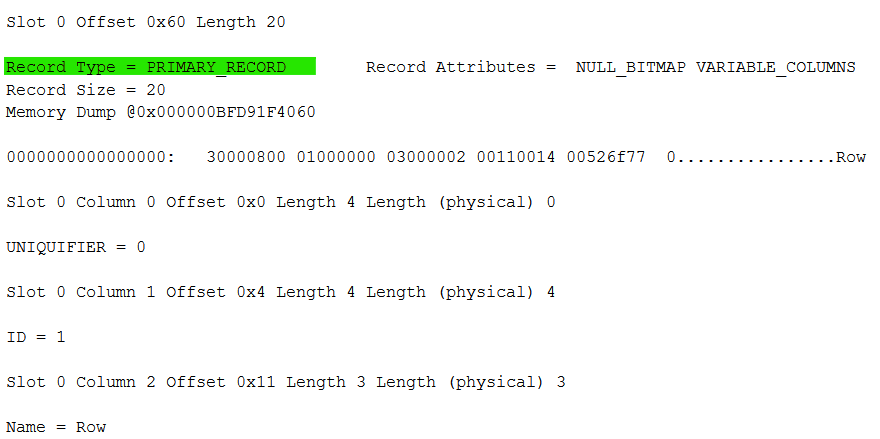
The following records are all showing as GHOST_DATA_RECORD

Marking Ghost Records
As mentioned in the first post, when a row is deleted SQL Server marks the record, the page, and allocation metadata to indicate the presence of ghost records. It’s simple to see the mark on the record and in the page header, and it is also known that a bit is stored in the Page Free Space (PFS) page to indicate the presence of ghost records on a page. This allows SQL Server to efficiently identify candidates for cleanup without scanning every page. The broader mechanisms used to signal database-level state are internal and not fully documented.
Summary
This post demonstrated how to disable and re-enable the ghost cleanup process, showed how ghost records are marked at the page level, and confirmed the effect through page inspection.
Although disabling the ghost cleanup process can be useful in specific, controlled scenarios, because it affects the entire instance it should only be used temporarily and with consideration of the overheads.
Next
The next post moves from examining page structures to exploring what happens in the transaction log, how it is used, and how ghost records are recorded.