

Partitioning is commonly thought of as a Maintenance feature within different database technologies, and its greatest strength lies in simplifying maintenance operations such as archiving, index management, and backup strategies. However, when implemented correctly, it can also improve query performance through techniques such as partition elimination and collocated joins.
What is Partitioning in SQL Server?
Partitioning is a feature within SQL Server (and other database technologies) that allows the rows of a table or index to be divided into smaller logical partitions, typically based on a partitioning key such as a date or numeric value. Partitioning used to be the proviso for Microsoft Customers who had an Enterprise Edition of SQL Server. However, since SQL Server 2016 SP1 it has also been available in Standard edition.
Horizontal vs Vertical?
Horizontal partitioning divides rows across multiple partitions, usually based on a date or numeric key.
Vertical partitioning separates columns into different tables or storage structures. This is far less common usage scenario in SQL Server.
Most use cases will be Horizontal Partitioning, and this is what will be the assumption of this Blog going forwards.
Choosing the Right Partition Key
- Choose an Appropriate Partition Key
- Date fields or a highly structured ID are good candidates for the key.
- GUIDs are generally not a good choice for range partitioning because their values do not naturally provide meaningful, sequential boundaries. Date or numeric columns with a natural range are often better candidates.
- Dates for instance work really well as they function as good partition boundaries e.g. by Month or Year
Where Can Partitioning Improve Performance and Maintenance?
- Heaps e.g. staging tables – as there are no Clustered Index, by partitioning it, it can just query against the partition instead of the whole table.
- Collocated Joins – If you join two large tables that are partitioned on the exact same partition key and boundary values, the query engine can pair up matching partitions directly. This dramatically reduces memory and CPU usage during large JOIN operations.
- Restore of data by partition – When partitions are mapped to separate filegroups, you can take advantage of SQL Server’s file/filegroup backup and restore capabilities. This can be particularly useful for very large databases where historical data is placed on separate filegroups, potentially reducing recovery times.
- Specific Queries – Partition Elimination e.g. See the below Use Case example below.
Specific Use Case
- Partition Elimination
- Coeo, recently helped a customer where on specific tables they have twenty partitions in use at one time. They were having some crippling performance issues. We identified the query responsible for the problem and recommended a change that allowed SQL Server to target the appropriate partition directly. You might expect the improvement to be roughly 20x because only one of twenty partitions needed to be accessed. In practice, the improvement was significantly greater because the reduction in the amount of data being considered also changed the overall cost of the query plan. The optimizer moved from a scan-based plan to a seek and no longer considered parallelism necessary.
- Why did this work so well? – Because SQL Server knows which partition contains the requested rows, it can avoid reading the remaining partitions entirely.
Can partitioning affect performance negatively?
The answer is yes; it can if you are not careful when setting up your partition.
Queries missing the Partition Key – It is important for instance that the Partition Key is included in the Where Clause. If the optimizer cannot determine which partitions contain the required rows, partition elimination cannot take place and SQL Server may need to access all partitions, and this means the database engine needs to scan all the partitions in the table. When the optimiser runs against a partitioned table, it must work out which partitions to access from the partition metadata, it has to work with multiple stats sets, has to read from multiple b-tree structures, compile the information and then access the relevant data, which can be more costly, especially with many tiny partitions.
Aggregations – functions such as MIN(), MAX() and AVG() can also highlight the potential downside of partitioning. If the aggregation is performed on a column other than the partitioning column and the query cannot eliminate partitions, SQL Server may need to evaluate multiple or all partitions. This is another reason to inspect the execution plan rather than assuming partitioning will improve performance.
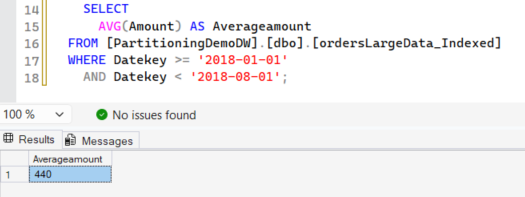
One thing we often observe is how queries running at scale can be overlooked. A query that takes a quarter of a second during testing may seem perfectly acceptable. However, if that query executes 1,000 or even 10,000 times each hour, the cumulative cost can become significant. This is why representative load testing is just as important for partitioned tables as it is for any other database object. This is an area that needs to be revisited as data volumes increase.
Partitioning for Maintenance
We have therefore seen that Partitioning can have some performance impact, both positive and negative. However, Partitioning was in the main designed for Maintenance. How can it help from this viewpoint? Below are the major maintenance reasons to use partitioning.
- Archiving of Data – Archiving is often performed using a date-based strategy, where data older than a defined retention period is moved out of the active table before being removed. Partitioning makes this process significantly more efficient by allowing an entire partition to be switched out rather than deleting rows individually.
The partition can be switched into a staging table, which can then be truncated. Because both the partition switch is metadata-only and the truncate operations are minimally logged, they complete very quickly and generate minimal transaction log activity. This approach is considerably faster and less resource-intensive than deleting large volumes of data.
It is important to note that a partition switch requires a schema modification (SCH-M) lock on the table. Although the switch itself is normally very fast, acquiring the required SCH-M lock can still cause blocking if concurrent activity prevents the lock from being obtained immediately. For this reason, it should still be scheduled during a maintenance window or another agreed period of low activity to minimise the impact on concurrent workloads.
- Align Your Indexes: If partition switching is part of your design, aligned indexes are generally preferable. An aligned index uses a compatible partitioning scheme with the base table, allowing the partition structure to be maintained during a switch. Nonaligned indexes can prevent or complicate partition switching and should therefore be used deliberately.
- Index & Statistics Management – allowing targeted rebuilds on specific partitions rather than the entire table. This means you can just re-index the latest data and leave older data as is. Statistics should also be considered separately from index maintenance, particularly where data distribution changes significantly between partitions.
- Lock Escalation – Lock escalation can occur at the partition level rather than the entire table (when LOCK_ESCALATION = AUTO is enabled), allowing concurrent activity on unaffected partitions.
From the above list the highest impact in terms of storage costs and also just making sure you are not storing old data that is no longer required and this is Archiving of Data, especially with GDPR and other Data Security Regulations in place for Customer Related Data.
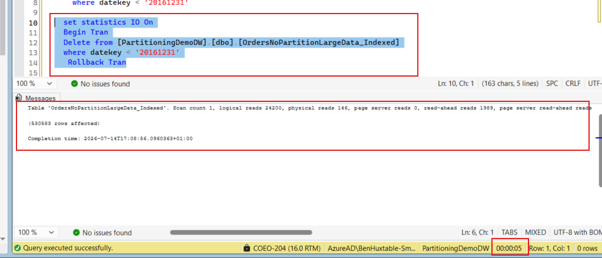
Let us see an example of a switch out operation and for those that used to watch Blue Peter. Here is a Partition I set up earlier. We have two versions of a table, one which is partitioned and the other is not. However, both have the same data in each and we will perform a Delete/Switch Out to show the difference.
Below we can see that to delete over 500,000 rows it takes over 5 seconds to delete using a typical delete statement on our non-partitioned table (OrdersNoPartitionLargeData_Indexed).
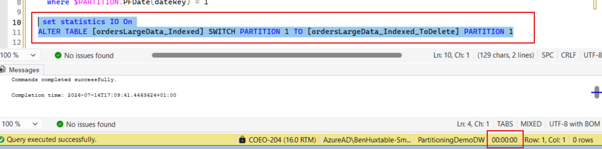
Whereas using the switch out command the partitioned table (ordersLargeData_Indexed) is pretty much instantaneous as per below.
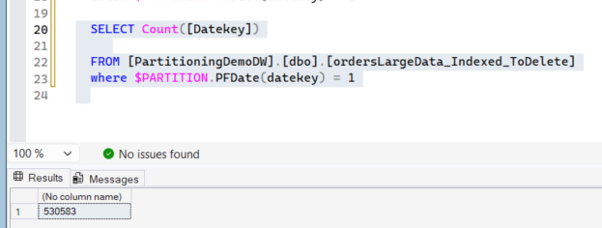
If we then run a Select Count on the _ToDelete version of the table confirms that the data has been moved successfully. At this point, the staging table can either be truncated or dropped, depending on your retention requirements.
The good thing using the Switch Command, or if no longer required the table can be deleted/truncated. One point to make though is this table also must have the same indexes on it as the source table, or the switch would fail, as well as definition of the two tables being identical in terms field names etc. Once completed, there should be some maintenance done on the partition in the form of using the Merge statement to remove any unused partitions. However, this should be done carefully. If the partition being merged is not empty, SQL Server may need to move data between partitions, potentially turning what was a metadata-only maintenance operation into an expensive data movement operation. This is why a well-designed sliding-window strategy maintains empty boundary partitions and uses SPLIT and MERGE carefully.
Conclusions
SQL Server partitioning was first and foremost designed as a maintenance feature, and that is where it delivers the greatest return on investment. However, as we’ve seen above, it can also provide substantial performance improvements when queries are written to take advantage of partition elimination and when related tables are partitioned consistently. Like many SQL Server features, partitioning is not a silver bullet, but when designed correctly, it can significantly improve both maintenance and performance.
A large table does not automatically justify partitioning. If queries rarely filter on the partitioning key, if data does not have a meaningful lifecycle, and if there is no significant maintenance benefit, partitioning may add complexity without providing a corresponding benefit.
Before partitioning, consider whether a well-designed indexing strategy, compression, archiving strategy or query optimisation would solve the underlying problem more simply. It is also important to remember that partitioning itself has a cost and introduces additional design and operational complexity.
I was inspired to write this blog after attending Maggie Naumova’s session at SQLBits earlier this year. If you would like to explore the topic further, Maggie also has a recording of a related SQLBits session from 2020 – https://www.youtube.com/watch?v=Rxu3IenrMBI
My colleague, Martyn Jones has also promised me that he will soon be releasing a further related Blog on Partitioning (No Pressure 😉), so if this has whetted your appetite for all things Partitioning there is more to come in the near future 😊