

The last post showed how to enable and disable the ghost cleanup task and how ghost records are represented on the data page. This post moves on to show how the delete process, including the marking of ghost records, is recorded in the transaction log.
If you haven’t read the earlier posts, it’s recommended as they introduce the core concepts and terminology and builds the understanding that’s evolved throughout this series. The demo code is also used and built on for the examples in this post:
- Post 1 – Ghosts! – Ghost Records and the Ghost Cleanup Process
- Post 2 – Seeing the ghost cleanup process in action
- Post 3 – Let the ghosts linger
- Post 4 – Ghosting in the transaction log
- Post 5 – The ghostly case of index corruption
- Post 6 – Questions answered
How the transaction log is used
The concepts discussed in the previous blog post can also be seen in the transaction log. The logical removal of rows (by marking them as ghost records), the associated allocation metadata updates, and the eventual physical removal of those rows by the ghost cleanup process are recorded as individual transaction log operations.
The demo code uses the undocumented function fn_dblog(), this provides a clear view of the internal sequence of events that SQL Server performs during a delete operation so the individual physical changes required to implement ghosting, and later, cleanup can be studied.
Below are some of the key operations that the demo will show:
Key transaction log operations during a delete:
- LOP_BEGIN_XACT | LCX_NULL
Starts a transaction and records the beginning of a unit of work in the transaction log. - LOP_DELETE_ROWS | LCX_MARK_AS_GHOST
Logically removes a row by marking it as a ghost record for later cleanup. - LOP_SET_BITS | LCX_PFS
Sets PFS status flags against a page indicating that a page contains ghost records. - LOP_COMMIT_XACT | LCX_NULL
Commits the transaction and records that the logged changes are complete and durable. - LOP_EXPUNGE_ROWS | LCX_CLUSTERED
Physically removes ghosted rows from the data structure during cleanup.
Demo
The code in this post is designed to be used in a test enrolment, not production.
Pre-requisites
Before running the code in this post, you’ll need to have created the database (see “Demo set up” in “Post 2 – Seeing the ghost cleanup process in action” then re-run the code used in “Post 3 – Let the ghosts linger” under the heading “Viewing ghost records on the data page”; this will insure the data in the transaction log is in the active part of the transaction log. If more time is needed to examine pages between steps, consider disabling the ghost clean-up process as described in “Post 3 – Let the ghosts linger”.
Fn_dblog()
As previously mentioned, the demo code will make use of the undocumented fn_dblog() table-valued function that allows reading the active portion of the transaction log.
The function accepts two parameters, representing the starting and ending Log Sequence Number (LSN). Passing NULL for both parameters returns all available records from the active transaction log, rather than restricting the output to a specific LSN range.
The result contains one row for each logged operation and includes information such as:
- Transaction ID – Identifies the transaction that generated the log record.
- Begin Time – the time the transaction started
- Transaction Name – The name of the transaction (e.g. INSERT, DELETE
- Transaction SID – Who started it (use SUSER_SNAME function to show meaningful name).
- Operation – The type of operation performed (for example, LOP_INSERT_ROWS, LOP_DELETE_ROWS, or LOP_COMMIT_XACT).
- Context – The type of page or structure affected (for example, LCX_CLUSTERED, LCX_HEAP, or LCX_PFS).
- Page ID – the physical file and page identifier affected (page number is hexadecimal).
- Slot ID– The record on the page.
- Current LSN – The unique Log Sequence Number identifying the log record.
- Description – Additional details describing the logged change.
Querying the transaction log
For this demo the ghost clean-up process is disabled prior to running the code from Post 3. We will therefore see records marked for deletion and have time to view the transaction log and how that relates to the pages.
/* Run the code from Post 2 */

/* Turn off the ghost cleanup process */
DBCC TRACEON(661, -1);

/* Run the code from Post 3 */

/* View the transaction log */

USE GhostDemo;
DROP TABLE IF EXISTS #TLog;

SELECT
             [Transaction ID]
       ,      [Begin Time]
    ,  [Transaction Name]
    ,  SUSER_SNAME ([Transaction SID]) AS [Started By]
    ,  [End Time]
    ,  [Operation]
       ,      Context
       ,      CONVERT(int, CONVERT(varbinary(4), SUBSTRING([Page ID], 6, 8), 2)) AS [Decimal Page ID]
       ,      [Slot ID]
       ,      [Current LSN]
       ,      [Description]
       INTO
             #TLog
FROM
             fn_dblog (NULL, NULL) as tl
WHERE
             SUSER_SNAME ([Transaction SID]) NOT IN ('sa', 'NT SERVICE\SQLTELEMETRY')
             OR
             [Transaction SID] IS NULL;

/* Show all log records in the transaction log ordered by Current LSN */
SELECT
             *
FROM
             #TLog
ORDER BY [Current LSN]
The demo shows the deleted records are marked as ghosts:

This shows:
- The transaction starting (LOP_BEGIN_XACT)
- The first record being marked as a ghost record (LOP_DELETE_ROWS | LCX_MARK_AS_GHOST)
- The PFS page is updated; this appears under a different transaction context because SQL Server updates allocation metadata using internal system operations. (LOP_SET_BITS | LCX_PFS) – the details column shows the change, stating a GhostBit will be recorded against the page
- The transaction commits (LOP_COMMIT_XACT)
Each record exists in a slot, within the slot array, on the data page. Each record being marked as a ghost has a Slot ID; a physical page location reference, not a permanent identifier. As we have deleted 11 records, there are 11 unique Slot IDs that are shown.
Note: The Page ID returned by fn_dblog() is a hexadecimal value, the code above converts to decimal so it can be compared more easily with DBCC PAGE and allocation metadata; the description will still show the hexadecimal version.
View the page
Using DBCC PAGE (shown in the last post) we can view page 352 and see the change:
/* View the page data */
DBCC PAGE(GhostDemo, 1, 352, 3);
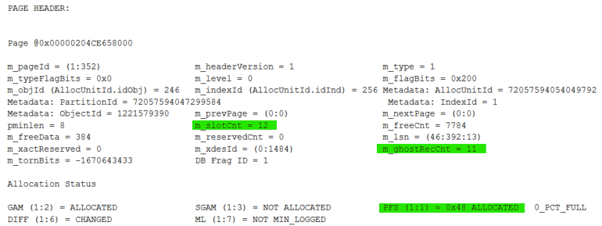
The header shows the slot count (m_slotCnt = 12), which can now be related to the Slot ID in the transaction log. At this point in time, the page header ghost record count (m_ghostRecCnt = 11) matches the number of rows marked as ghosts in the transaction log LCX_MARK_AS_GHOST being written against 11 slots. We can also see the PFS page in use (1:1).
As shown in the last post, the records that are ghosted are now marked as such on the data page against their row:

The PFS page:
DBCC PAGE can also be used to vie the data on the PFS page
DBCC PAGE(GhostDemo, 1, 1, 3);
As seen in the transaction log, the PFS entry for page 352 is updated and the GhostBit is set, indicating that the page contains ghost records.

So Far…
11 records have been deleted, and this can be seen recorded in the transaction log as well as on the data and PFS pages.
Enable the ghost clean up
/* When all relevant pages have been viewed, turn the ghost cleanup process back on */

DBCC TRACEOFF(661, -1);
Viewing the transaction log again will show LOP_EXPUNGE_ROWS | LCX_CLUSTERED, this is the ghost clean up process physically removing the row data from page 352, in this example it’s the clustered index. Also shown will be an update to the PFS where the ghost bit for the page is removed.
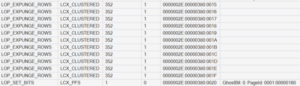
Full run with ghost clean-up enabled
A normal delete operation follows the same process, but the physical removal of rows may occur more quickly, depending on system activity and when the ghost cleanup task runs. On a low use demo system, the cleanup will likely be fast.
Full Life Cycle Demo
The next demo refreshes the database, then adds and removes records, showing the full life cycle of the process
/* Freshen up the database */
USE master;
GO
ALTER DATABASE GhostDemo SET SINGLE_USER WITH ROLLBACK IMMEDIATE;
DROP DATABASE GhostDemo;
GO

/* Create demo database, table and insert data */
CREATE DATABASE GhostDemo;
GO

USE GhostDemo;
GO

CREATE TABLE [dbo].[ViewGhost](
       [ID] [int] IDENTITY(1,1) NOT NULL,
       [Name] [varchar](100) NULL
) ON [PRIMARY];
GO

CREATE CLUSTERED INDEX PK_ViewGhost
ON dbo.ViewGhost
(ID);
GO

/* Create ghosts */
USE [GhostDemo];

/* print results to query window */
DBCC TRACEON(3604);
GO

/* Insert sample rows */
INSERT INTO
             dbo.ViewGhost
             (Name)
VALUES
             ('RowText')
GO 12

/* Logically delete all rows but 1 */
DELETE
FROM
             dbo.ViewGhost
WHERE
             ID > 1;
GO
Once the records have been deleted, we can view the transaction log. Depending on system activity, the ghost cleanup task may run quickly or may be delayed. If the removal of the records cannot be seen straight away, please wait a little longer and try again, they will eventually be physically removed.
/* Get the transaction log data */
DROP TABLE IF EXISTS #TLog;

SELECT
             [Transaction ID]
       ,      [Begin Time]
    ,  [Transaction Name]
    ,  SUSER_SNAME ([Transaction SID]) AS [Started By]
    ,  [End Time]
    ,  [Operation]
       ,      Context
       ,      CONVERT(int, CONVERT(varbinary(4), SUBSTRING([Page ID], 6, 8), 2)) AS [Decimal Page ID]
       ,      [Slot ID]
       ,      [Current LSN]
       ,      [Description]
       INTO
             #TLog
FROM
             fn_dblog (NULL, NULL) as tl
WHERE
             (
             SUSER_SNAME ([Transaction SID]) NOT IN ('sa', 'NT SERVICE\SQLTELEMETRY')
             OR
             [Transaction SID] IS NULL
             )
             AND
             (
                    (
                    [Transaction Name] NOT LIKE '%QDS%'
                    AND
                    [Transaction Name] <> 'UpdateQPStats'
                    )
             OR
             [Transaction Name] IS NULL
             );

/* Show all log records in the transaction log ordered by Current LSN */
SELECT
             *
FROM
             #TLog
ORDER BY [Current LSN]
First, we see the ghosting …

… then the physical removal, which is not part of the user’s DELETE transaction; it is performed asynchronously by the ghost cleanup task.

Summary
This post has shown the complete lifecycle of a delete operation that uses SQL Server’s ghost record mechanism and how each stage is represented internally.
Using the undocumented fn_dblog() function, we were able to see that a delete operation is not immediately a physical removal of rows. Instead, SQL Server first performs a logical removal by marking rows as ghosts:
- LOP_BEGIN_XACT records the start of the delete transaction.
- LOP_DELETE_ROWS | LCX_MARK_AS_GHOST records each row being logically removed by marking it as a ghost record.
- LOP_SET_BITS | LCX_PFS updates the Page Free Space (PFS) metadata, setting the GhostBit for the affected page to indicate that ghost records exist.
- LOP_COMMIT_XACT completes the user transaction, leaving the ghost records physically present on the data page.
Using DBCC PAGE, we were then able to correlate the transaction log entries back to the physical data page. The Slot ID from the transaction log identified the individual records affected, while the page header showed the increase in m_ghostRecCnt and confirmed that the rows remained on the page in a ghosted state.
The PFS page provided another view of the same change; the GhostBit was set against the data page entry, allowing SQL Server to identify pages that contain ghost records requiring cleanup.
Once the ghost cleanup process was enabled again, the asynchronous cleanup task removed the rows physically from the page. This was visible in the transaction log through:
- LOP_EXPUNGE_ROWS | LCX_CLUSTERED, showing the physical removal of the ghosted records.
- LOP_SET_BITS | LCX_PFS, clearing the GhostBit once the page no longer contained ghost records.
The complete process demonstrates the separation between logical deletion and physical removal
Further Reading
Roberto has previously published an overview of fn_dblog() in his blog post: Inside the Transaction Log file using fn_dblog() and fn_full_dblog()
Next
The next post in the series will cover a scenario we worked on for a client where the ghost cleanup process appeared to be the issue. It demonstrates how we worked with Microsoft to identify the root cause and develop a workaround tailored to the client’s needs. Unfortunately, due to the level of support available for the version of SQL Server they were running, a fix from Microsoft for this edge case was not provided.